The Dhaka Times Desk ইউটিউব থেকে ভিডিও আমরা সবাই ডাউনলোড করতে পারি। ইউটিউব সেন্টার We have already known that you can download videos from YouTube with Dia. But what has anyone tried to download videos from Facebook! Today's tutorial will tell you how to download videos from Facebook.
There are many methods to download videos from Facebook. We will know three simple methods step by step with pictures.
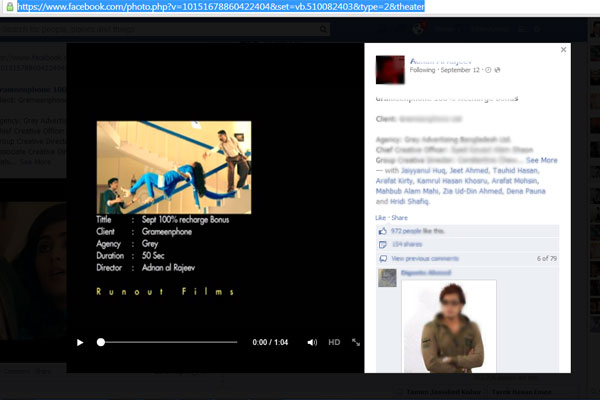
First select any Facebook video that we want to download. Clicking on the video will bring up the image below. I will copy the URL of the browser from there. For ease of understanding I have taken the Facebook video link below as an example.
You can download Facebook videos or any desired video from the following three sites.
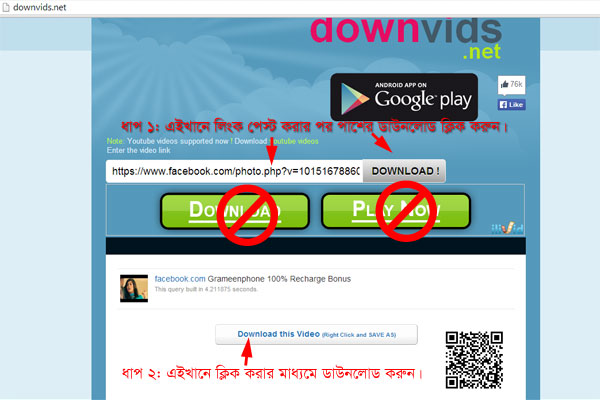
ব্রাউজারে নতুন একটি ট্যাব খুলে সাইটটির ঠিকানা Downvids.net Enter with Facebook video in actual marked place (as per step 1) like below image URL The URL Paste the link. Click the download button. It should be noted that the buttons of yellow color cannot be clicked.
Now by clicking on the marked place (as per step 2) the video will start downloading.
if Android মোবাইল থেকে ফেসবুক ভিডিও ডাউনলোড করতে চান তবে এখান থেকে Downvids Android app The application must be downloaded.
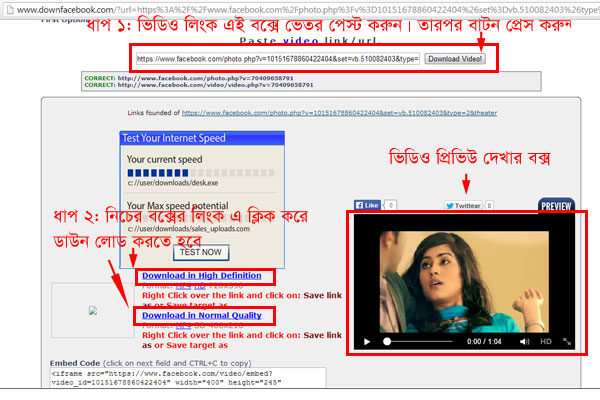
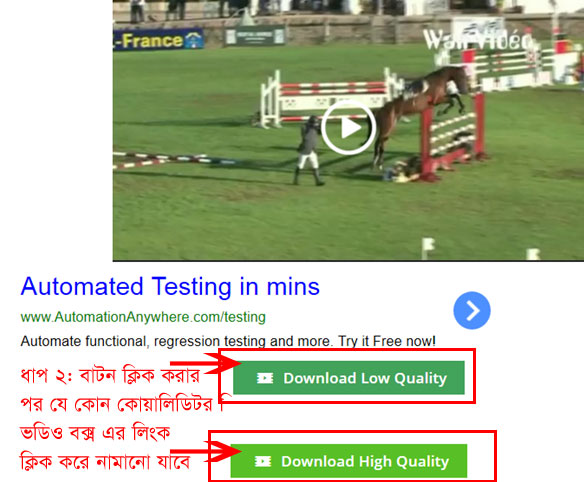
This procedure is similar to the above step. First the website Downfacebook.com Go to step 1 and paste the video link in the box and click on the button marked like the image on the right side. When the video is ready to download, the video preview will appear in the preview box. According to step 2, the download will start by clicking the link marked low quality or high quality video.
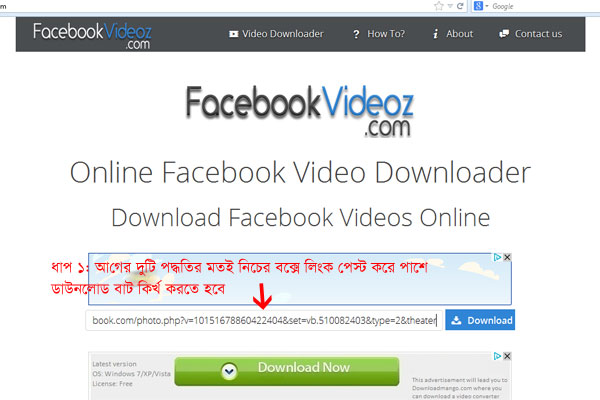
এটি আরেকটি ওয়েব সাইট ডাউনলোড করার। প্রথমে সাইটটির লিংক facebookvideoz.com must go to As per step 1 in the image shown below, paste it in the video link box and click on the button marked as shown in the image on the right side. Note that the URL link must be https. http may cause download problems.
When the video is ready, you can download the low quality or high quality video by clicking on the button as shown in the image below.
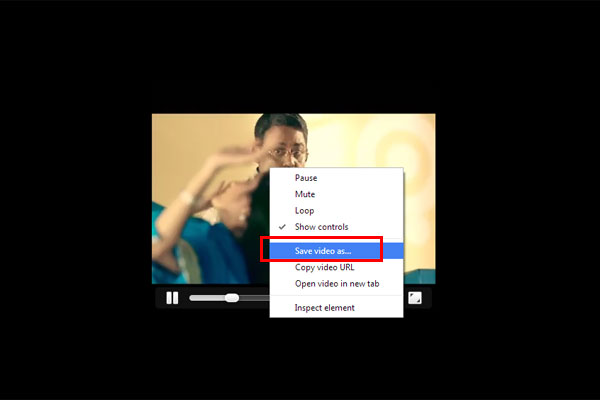
Do not click on any link or button other than the link or button shown in periodic image. For some reason, if it looks like the picture below, you can save the video by right clicking on the video and clicking Save Video as... from the option.
References: The Tech Journal
This post was last modified on নভেম্বর ৬, ২০১৪ 9:06 am
দি ঢাকা টাইমস্ ডেস্ক ॥ সম্প্রতি বড় পর্দায় মুক্তি পেয়েছে আদিত্য ধর পরিচালিত সিনেমা ‘ধুরন্ধর’।…
দি ঢাকা টাইমস্ ডেস্ক ॥ আজ মহান বিজয় দিবস। বাঙালি জাতির হাজার বছরের বীরত্বগাথার এক…
দি ঢাকা টাইমস্ ডেস্ক ॥ ইতালির মিলান থেকে লন্ডনগামী একটি বিমানে উড়ান শুরু হওয়ার পর…
দি ঢাকা টাইমস্ ডেস্ক ॥ শুভ সকাল। মঙ্গলবার, ১৬ ডিসেম্বর ২০২৫ খৃস্টাব্দ, ১ পৌষ ১৪৩২…
দি ঢাকা টাইমস্ ডেস্ক ॥ স্বাস্থ্য রক্ষায় ব্যায়াম অত্যন্ত গুরুত্বপূর্ণ, আর তার মধ্যে সবচেয়ে সহজ,…
দি ঢাকা টাইমস্ ডেস্ক ॥ দেশের বাজারে শক্তিশালী ব্যাটারিযুক্ত নতুন মডেলের স্মার্টফোন নিয়ে আসার ঘোষণা…


View Comments
i cun't found URL link
Thanks for the nice post...
Great...
Virus dhokar voy ase niki